


Contents
- Introduction: the Decision to Write
- TransplantNet Correspondence vs. Traditional Correspondence
- Writing Your Letter
- Using TNet: Step-by-Step Instructions
- Using Regular Mail: Instructions
Introduction: the Decision to Write
Sometimes, recipients of organ transplants write to the families of the donors who saved their lives to express their gratitude. Many donor families find comfort during a time of tragedy and grief in the letters from the recipients of their loved one’s gift of life. Through them, they are able to see their loved one’s lasting legacy.
There is never an obligation to write a letter. The decision to communicate with your donor family is very personal, and one that you may pursue at your own pace. Likewise, the choice for donor families to accept correspondence from the transplant recipients is also very personal. Everyone grieves differently, and so it is possible that a long time will pass before a donor family feels ready to read letters from the transplant recipients. Some may never feel ready. Letters from recipients will never be sent directly to the donor families without their consent.
Additionally, there is no guarantee that you will hear back from your donor family. Although writing to the transplant recipient is helpful during the grieving process for some families, for others, it can be a painful reminder of tragedy. We ask that you respect their decision.
TransplantNet Correspondence vs. Traditional Correspondence
If your transplant program has a TNet account, there are two methods available to you for contacting your donor family: through TNet and through regular mail. This section explains their differences and similarities so that you can choose the route for you.
Please note that sending a letter to your donor family via TNet is only available to transplant recipients whose transplant programs have TNet accounts. Click here for a list of participating transplant programs — we plan for this list to expand gradually.
The basics of the TNet and traditional correspondence processes are the same. First, you write your letter intended for your donor family. Then, your transplant program verifies your identity and reviews your letter for appropriateness. If no changes are indicated, your transplant program forwards your letter onto the organ procurement organization (OPO) that worked with your donor family. The OPO then reviews your letter once more and checks in with your donor family to ensure that they are willing and ready to receive recipient letters. Finally, if there are no concerns about your letter, the OPO sends it to your donor family.
The key differences between communicating with your donor family through TNet and through the traditional hard-copy mail process are the medium, waiting time, and automation.
- Medium: Letters sent via TNet are written and forwarded electronically on our user portal. Participating transplant programs and OPOs review and direct letters on their TNet accounts. Intended recipients will receive letters for them in an email from TransplantNet unless they do not have a known email address, in which case the final reviewers will print and mail the letters to them. Meanwhile, the traditional correspondence method involves hard-copy letters and U.S. postal mail.
- Automation: Upon registration, you indicate your transplant program, so our system automatically forwards the letters you write to the TNet inbox of your transplant program. The coordinator from your transplant program can review and then pass on or send back your letter (with an explanatory note) straight from his or her account. At each review step that your letter undergoes, you receive automatic status update emails from our system so that you know how close your letter is to reaching your donor family. In U.S. postal mail correspondence, your letter will be manually addressed and forwarded at each step.
- Time: The TNet system delivers electronic letters almost instantaneously as they are directed to different people throughout the process, eliminating the mail time that hard-copy correspondence requires.
TNet was created to streamline safe donor family to transplant recipient correspondence and make the process more convenient and clear for all those involved — recipients, donor families, and coordinators. Below we summarize the benefits of using TNet in contrast to the traditional method.
- Letters cannot be lost during the review and forwarding process
- Length of letter review and handling is shortened significantly
- Users receive immediate updates on the status of their letters in the forwarding process, giving them peace of mind
- Guidelines and suggestions for writing letters are available on the portal as transplant recipients and donor families compose their letters
- TNet is easier for OPOs and transplant programs to handle, as they can approve or send back letters with the click of a button and forward letters directly through the system
- If needed, users can get their questions answered quickly through TNet support
Writing Your Letter
Things You Can Include
Writing a letter to your donor family may feel overwhelming and difficult. Here are some suggestions to help you get started.
- Recognize the donor family and express your gratitude
- Briefly discuss why you needed a transplant
- Tell them how the transplant has impacted your life — perhaps talk about the activities you can now do because of your transplant
- Write about significant life events or adventures that you may not have been able to experience if you had not received the transplant
- Tell them about yourself: your age, family composition, hobbies, interests, job (without the company name), and geographic state are all non personally identifiable pieces of information that you could include
- Consider including a picture of yourself or artwork — you can add up to three image files in your letter on TNet
What to Avoid
- Try to use simple language and not include too much medical terminology
- Do not refer to your transplanted organ by a nickname
- Do not pressure your donor family to meet or write back
- Avoid strong language and profanity
- Of course, you may not include threats, requests for money, or any other obviously inappropriate content
- It is recommended that you maintain your anonymity in your early letter exchanges by leaving out identifiable personal information. Some OPOs may restrict the sharing of such personal information altogether; read more in the next section
Your Anonymity and Confidentiality
Organ donations are handled as anonymous gifts. Thus, each OPO has different policies and procedures regarding the sharing of information that may give away your identity, such as your full name, email address, phone number, social media accounts, and transplant program. Some OPOs may edit or send back letters from transplant recipients and donor families if they include such information. Others will want to speak with both the author and the intended recipient of the letter to discuss the implications and possible outcomes and ask them to sign a general release. If you plan to provide personal information or contact address in your letter, please keep in mind that a reviewer may edit it out.
The policies of OPOs may also differ regarding the inclusion of a photo of yourself in your letter. Most will pass them on normally as long as there is no other identifiable information, but some may interpret such photos as personally identifiable information in and of themselves.
Click here for a comprehensive list of OPOs and their website links if you would like to check the policies and procedures of your local OPO.
Using TNet: Step-by-Step Instructions
If you decide to use TNet to send your letter, follow the instructions below. If you would like to use the traditional method, click here for general instructions.
Accessing the User Portal
The TNet user portal is where you can send your electronic letter to your donor family. To access the user portal, click on the “Send Letter” button (envelope icon) next to the “Home” button at the top of this website.
You may also click here.
1. Register and Verify Account
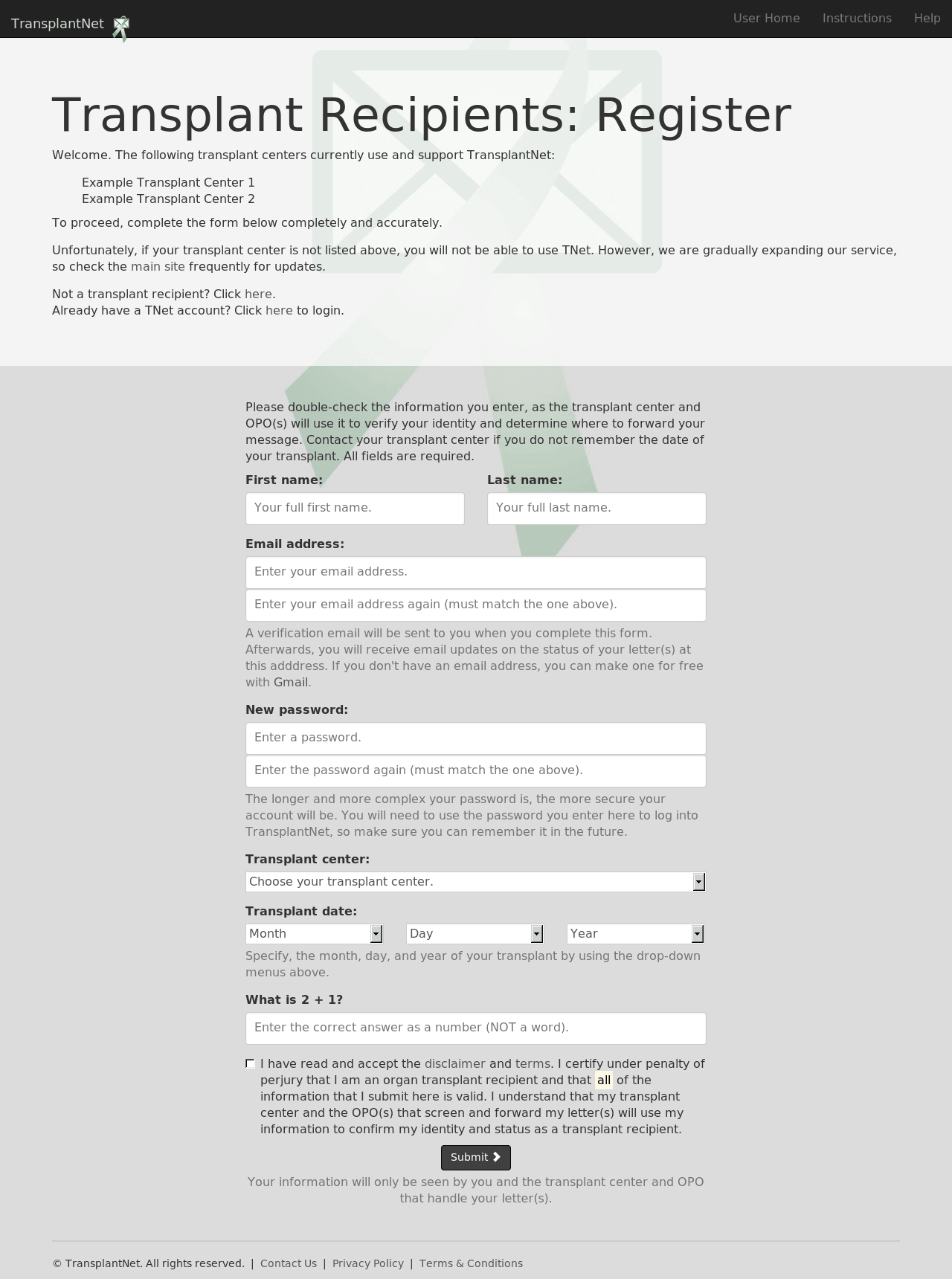
On the user portal landing page, click on the button that says “organ transplant recipient.” It will take you to a login page. However, you do not have a TNet account yet, so you must register first — click on the “Register now” button. It will take you to a registration form. You’ll need to have an email address (if you don’t have one, you can create a free one with Gmail) and know the date of your transplant. Fill in all of the fields, read and accept the terms and privacy policy, and hit the “Submit” button at the bottom.
After you submit the form, our system will send you an email with a link from “TransplantNet Portal” (gro.tentnalpsnart@ylperon). This email could take up to fifteen minutes to reach you, so please be patient. If it does not come for a while, you may want to check your spam box. Once you receive and open the email, click on the link or copy and paste it into your address bar. Our system will then tell you that your account was verified and that you may now log in.
Click to enlarge.
2. Log into Your Account
Head back to the transplant recipient login page and enter your email address and password. (Reminder: never give your password to anyone, even someone who claims to be a TNet administrator. This is a good practice on any website). Then hit “Submit.”
Note: if you ever forget your password, there is a link to create a new one on the login page.

Click to enlarge.
3. Write Your Letter
Write your electronic letter to your donor family on a word processor like Microsoft Office, LibreOffice, Notepad or TextEdit, keeping in mind our guidelines and suggestions. We recommend that you do this on your computer first so that you won’t accidentally lose what you have written by writing directly on our “Send a Letter” page and then leaving the page by mistake. Once you have written your letter, copy and paste (click here if you do not know how to do this) your letter into the big text box on the “Send a Letter” page that you reach after you log in. Then, with the text box toolbar, you may add formatting to your letter if you would like. You may also hit the print icon to print your letter.
The letter input box should look like it does in the screenshot here. If it does not show up correctly for you, try refreshing the page and/or restarting your internet browser. If it still does not work, please contact support.
After the letter input box, you may select and insert up to three image files (with extensions .jpg, .png, or .gif) from your computer to include with your letter. Click here for information on including a photo of yourself.

Click to enlarge.
4. Decide If You Would Like to Publish Your Letter
TNet allows you to indicate if you would like to have your letter (or an excerpt of your letter) publicly viewable on our website for visitors. All public letters will have any and all potentially identifiable information (full names, locations, contact information, etc.) about their author and their intended recipient removed prior to being posted. They may be shared by particularly moved visitors on social media platforms like Facebook, Google+ and Twitter.
We have made the option to publish your letter available because we believe that your words, more than any others’, will give the public a heartfelt and compelling view of how much organ donation impacts both donor and recipient families. Public letters written by real transplant recipients and donor families could very well inspire many to become donors and alleviate the donor shortage. However, we do not expect most users to feel comfortable with sharing their letter with the public — the default choice is no.
If you decide that you would like your letter to be posted on our website, click the corresponding “Yes” option. If you would like to only allow a certain part of your letter to be public, click “Yes, but only a certain excerpt of my letter.” A text box under the option will then appear — paste your desired excerpt here. Then, you may indicate whether you allow us to post the image(s) you have attached, if any, along with the published version of your letter or letter excerpt on the website.

Click to enlarge.
5. Send Your Letter
Please check over your letter before sending. There is no way to “take back” a letter function on the website once it is sent; if you wish to do so, you must contact your transplant program. Additionally, you may want to review our terms and conditions agreement.
Once you are ready, all you need to do is hit the “Send my Letter” button. Your letter will then be sent to your transplant program’s TNet inbox.
After You Hit “Send”
The TNet system will notify you by email when your transplant program approves your letter and passes it on to the appropriate OPO. You will also receive an email with the contents of your letter if a coordinator needs to send your letter back to you (for example, if you need to make revisions or if your donor family is not ready to receive correspondence at the current time).
Please note that the coordinators who handle your letter may make minor edits to your letter during the review process to comply with the policies of their respective organizations. These may include removing a last name, removing an image, or omitting identifiable information. Most likely, the coordinators will contact you if they make such edits to your letter.
In the case that your letter is approved by your transplant program and the OPO to which it is directed next does not have a TNet account, your transplant program will forward it to the OPO by email or regular mail and it will then be handled outside of TNet — you will no longer receive status updates directly from our system. Otherwise, our system will email you when your letter is forwarded to your donor family.
If your donor family wishes to respond to your letter, they may do so through the TNet system, the manual U.S. postal mail process, or personal contact addresses depending on each situation. You may continue to use TNet to send correspondence.
We suggest that you delete your TNet account if you know that you will not be using it in the future. You can do this on the “Settings” page, which is linked on the user navigation top bar. You may only delete your account once you have no letters awaiting review in our system.
Using Regular Mail: Instructions
1. Write Your Letter
You may write your letter on a card or piece of paper. You could also type your letter on a computer and print it out. Additionally, you may want to include a photo or piece of artwork.
2. Mail Your Letter
Write your full name, your date of transplant, organ(s) received, and the name of your transplant center on a separate piece of paper and mail it with your letter or card to your transplant center.
3. Allow Time
The forwarding process (described above) may take several weeks after you have mailed your letter. However, you may want to contact your transplant program to check in if you do not hear anything after a long time. And remember, if your donor family does receive your letter, they may not feel ready to respond immediately.